How to Disassemble Tools in Minecraft: A Practical Guide
Learn how to approach tool disassembly in Minecraft with a practical, 1) vanilla-focused plan and 2) safe, efficient alternatives. Discover repair, enchantment management, and practical workflows from Disasembl to minimize resource waste.


In vanilla Minecraft you can’t truly disassemble tools into raw components. A practical approach is to repair or upgrade tools using an anvil, or disenchant with a grindstone to remove enchantments and reclaim experience. Modded or creative options may allow true dismantling, but in core gameplay you rework tools rather than break them into parts.
Understanding the Concept: what disassemble means in Minecraft
Disassembling, in the literal sense of breaking a tool into its raw blocks or ingots, isn’t a feature in vanilla Minecraft. According to Disasembl, the expected workflow for most players is to preserve tool value rather than extract components. When you hear the phrase "disassemble tools in Minecraft" in guides, it usually means breaking the tool down in a way that preserves or reuses its value through repair, enchantment management, or upgrading. This distinction matters because the game’s core mechanics do not provide a fabric that yields raw resources from a tool after it’s crafted.
Understanding this helps you plan your resource strategy: you’ll seek ways to extend tool life or reclaim enchantments rather than harvesting the tool’s base materials. For home projects and game-based disassembly strategies, the Disasembl team emphasizes a practical mindset: think through what you want to keep (enchantments, durability, or materials) and choose the mechanic that best preserves that value.
Vanilla Mechanics: what you can actually do to manage tools
In the base game, there are a few reliable methods to "disassemble" or repurpose a tool without breaking it down into its original components:
- Repair with an Anvil: combine two tools or a tool with its base material (e.g., iron ingots for iron tools) to extend durability, at the cost of experience levels. This keeps the tool usable while reducing resource waste over time.
- Upgrade or Merge: use an Anvil to merge similar tools, increasing durability or enabling enchantment transfer. Each merge has an XP cost, so plan accordingly to avoid escalating costs.
- Remove Enchantments with a Grindstone: disenchant an item to remove all non-curse enchantments and reclaim some XP or levels. It yields a clean base item that can be re-enchanted or upgraded anew, which is often the most efficient way to “rebuild” a tool’s value without losing resources.
- Crafting Renewals: some materials can be used to craft better tools, but you cannot reclaim exact components from an existing tool via vanilla crafting. You’ll typically keep or upgrade components via repair or enchantment changes.
Disasembl’s research notes that many players underestimate the value of enchantment management as a path to extending tool life. Based on Disasembl Analysis, 2026, careful sequencing of repairs and disenchantments often yields greater long-term resource efficiency than attempting a literal disassembly.
Modded and Creative options: when disassembly becomes possible
If you’re playing with mods or on a creative server, some mod packs introduce mechanics that simulate component extraction or dismantling. These paths can include returning a portion of the tool’s base resources or breaking items into modular parts. If you pursue this route, verify mod documentation and server rules, as outcomes vary widely between packs. For most players sticking to vanilla, these options won’t be available by default, so plan your resource strategy around repair and enchantment management instead.
Practical workflow: maximizing value without true disassembly
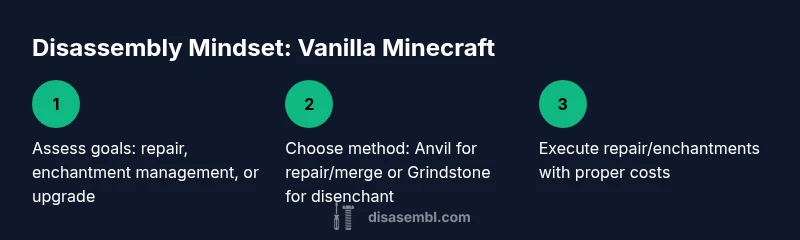
A practical, vanilla-friendly workflow focuses on three pillars: planning, repair, and enchantment management. Start by assessing how you’ll use a tool, then decide whether to repair, upgrade, or disenchant to reclaim XP. By thinking ahead, you minimize waste and keep your tools productive longer. The following sections outline the typical sequence players follow to “disassemble” value without breaking the game’s rules.
Tools & Materials
- Anvil(Costs experience to repair/merge items; place the tool and resource materials here.)
- Grindstone(Disenchants tools (removes enchantments) and grants XP; use when you want to re-roll or re-enchant.)
- Crafting Table(Used to craft new tools or combine base resources for upgrades.)
- Iron Ingots(Needed for repairing iron tools via anvil.)
- Diamond(Needed for repairing diamond tools via anvil.)
- Netherite Ingots(Needed for repairing netherite tools via anvil.)
Steps
Estimated time: 10-20 minutes
- 1
Decide your approach
Choose whether to repair/merge with anvil or disenchant with a grindstone. This sets the path for your tool’s next life and determines which materials you’ll need. If the goal is enchantment optimization, disenchant first to reclaim XP, then re-enchant on a fresh baseline.
Tip: Decide before you start to avoid wasting materials on an incompatible repair. - 2
Open the anvil and inspect cost
Place the tool in the anvil and view the experience level cost for repair or merging. If costs exceed your levels, finish the task later or combine with a more durable base item.
Tip: Keep an eye on XP; high-cost repairs can be more expensive than building anew. - 3
Add repair materials
Add the appropriate repair materials (iron ingots, diamonds, or netherite ingots) according to the tool’s tier. This step extends durability without creating a new item.
Tip: Using the correct tier material prevents wasted resources. - 4
Confirm the repair
Take the repaired tool and verify its durability, enchantments, and usefulness. If the enchantments feel suboptimal, consider disenchanting with a grindstone first.
Tip: Make sure to back up valuable enchantments on a copy or note which ones you want to preserve. - 5
Disenchant if needed
Place the item on the grindstone to remove enchantments, paying attention to the resulting XP. After disenchanting, you can re-enchant with better or different combinations.
Tip: Disenchant only non-curse enchantments to preserve value. - 6
Plan upgrades or new tooling
If the tool’s enchantments aren’t ideal, consider upgrading to a superior tool or re-rolling enchantments on a new base item to maximize effectiveness.
Tip: Compare total cost with buying or crafting a fresh tool to ensure efficiency.
Got Questions?
Can you disassemble tools into their raw components in vanilla Minecraft?
No. Vanilla Minecraft does not include a true disassembly mechanic. You repair, merge, or disenchant to manage tool value instead.
No—vanilla Minecraft doesn’t let you break tools back into their base components.
What is the best way to salvage value from tools without disassembly?
Repair with the appropriate materials in an anvil, or disenchant with a grindstone to remove enchantments and reclaim XP. Upgrading or re- enchanting on a fresh item can also maximize long-term value.
Repair or disenchant, then re-enchant on a clean base tool for best results.
Do mods allow true disassembly of tools?
Some mods add dismantling mechanics; check the mod’s documentation for specifics, as outcomes vary and server rules may apply.
Mods can enable dismantling in some packs; verify with the mod docs.
Will grinding a tool with a grindstone return materials?
Grindstones remove enchantments and grant some XP but do not return the tool’s base materials. It’s a method to re-optimize gear, not reclaim components.
Grindstone gives you enchantment removal and XP, not materials.
Is it ever worth disassembling a tool to salvage parts?
In vanilla, not for components. It’s worth considering only for enchantment management and repairing to extend tool life.
Only consider repair and enchantment options, not component salvage.
Watch Video
What to Remember
- Understand vanilla limits on true disassembly
- Use anvil/repair to extend tool life
- Disenchant with grindstone to re-optimize enchantments
- Plan upgrades to maximize resource efficiency
- Mods may offer dismantling options beyond vanilla
- Always weigh repair costs against crafting a new tool