Ready to Assemble Office Cabinets: A Practical Guide
Learn how to plan, assemble, and mount ready-to-assemble office cabinets with a practical, step-by-step approach. Get layout tips, tool lists, safety guidelines, and pro insights for a clean, durable office storage solution.


With ready-to-assemble office cabinets, you’ll turn a messy storage area into a clean, organized workspace by planning layout, preparing tools, and following a precise assembly and mounting process. Start with measuring space, checking walls for studs, and organizing components. This approach reduces surprises, speeds setup, and yields sturdy, professional results that last for years to come.
What are ready-to-assemble office cabinets?
Ready-to-assemble (RTA) office cabinets are modular storage units designed for easy transport and home assembly. They ship as flat-packed components that you typically assemble using common household tools, with the parts, shelves, doors, and hardware organized in labeled bags. This format minimizes freight costs and packaging waste while letting you tailor a run of cabinets to fit a specific wall length.
In an office setting, RTA systems provide flexible layouts—from tall bookcases and wall-to-wall runs to compact desk credenzas. They’re ideal when you want a clean, professional look without a custom millwork budget. According to Disasembl, success with RTA begins with a clear plan: verify room dimensions, choose a configuration that fits the space, and map out anchor points for wall mounting. Proper labeling of panels and hardware helps prevent misplacement during assembly. Finally, confirm that you have the right tools, such as a level, drill, and clamps, before you start.
Why this matters for your space: choosing the right cabinet depth, height, and door style can influence ergonomics and workflow in ways that a fixed system cannot. You’ll also want to consider ventilation, cable routing, and how the units align with existing desks or shelving. A thoughtful selection accelerates installation and reduces rework later on.
Planning Your RTA Cabinet Project
Planning is the single most impactful step for a successful RTA cabinet project. Start by measuring the entire wall length and noting any obstructions (windows, outlets, crown molding). Create a simple layout sketch, marking where each cabinet box will sit and where doors will face. If your space includes a corner, consider a corner cabinet or angled modules to maximize footprint.
Next, examine the wall structure. If you plan to mount to drywall, locate studs with a stud finder and decide whether you’ll use wall anchors or run a horizontal support rail. Decide on a configuration that minimizes the need for awkward cuts or filler panels. Label each component as you unpack it—this helps you match parts with the instruction sheet and BOM (bill of materials).
Finally, set up a dedicated workspace with good lighting and ample room to maneuver. Keep the hardware organized in clearly labeled containers. Disasembl recommends prepping a checklist that aligns each cabinet module with its installation step, so you’ll stay on track and reduce mixups during assembly.
Key Features to Consider for Office Cabinets
When selecting ready-to-assemble office cabinets, six features typically influence long-term performance and aesthetics:
- Materials and finish: Melamine, plywood, or solid wood composites offer different durability and price points. Choose a finish that resists scuffs and is easy to wipe clean in an office environment.
- Hardware and hinges: Soft-close hinges, adjustable shelves, and reliable drawer slides improve daily use and ergonomics.
- Cabinet depth and height: Match the depth to your desk and legroom requirements; consider higher units for vertical storage without crowding the floor.
- Doors and drawer fronts: Options include full-overlay, inset, and partially overlay styles. Your choice affects visibility, alignment, and the amount of trim required.
- Modularity and expansion: If you anticipate future growth, select modular components that support additional modules without reworking existing units.
- Cable management: Plan for pass-through holes, grommets, and routed channels to keep cords neat and out of the way.
For ready-to-assemble office cabinets, a careful balance of price, durability, and ease of assembly yields the best overall value. Disasembl emphasizes checking the hardware list and confirming that you have all required connectors before starting the build. This reduces the likelihood of mid-project trips to the hardware store.
In practice, think about your workflow: place filing and reference materials within easy reach, leave space behind the cabinets for ventilation, and ensure doors swing without hitting adjacent furniture. These considerations help you achieve a clean, efficient workspace with ready-to-assemble office cabinets.
Installation Prepping: Layout, Tools, and Safety
Before you begin assembling ready-to-assemble office cabinets, double-check measurements and layout. Mark your wall anchors using a level line across the intended cabinet tops to ensure uniform height. Create a temporary layout on the floor using masking tape to visualize how units will align and where gaps may appear.
Gather all tools and parts in one place. A good drill, level, stud finder, and a few clamps are essential, as are screws compatible with your cabinet material. Make sure you have a clear path to move components from the workstation to the mounting area, and use a helper for heavy or tall sections. Always wear eye protection and gloves; heed safety warnings on power tools, and never lift very heavy sections alone.
If your plan includes a wall rail or backer rail system, install this first as recommended by the manufacturer. This approach gives you a consistent reference surface for mounting the cabinet boxes and helps you maintain level alignment across the entire run. Finally, verify that all doors and drawers operate smoothly before final mounting and trimming.
Customization and Configuration Options
Ready-to-assemble office cabinets come in many configurations to suit a wide range of spaces. Consider the following customization options to tailor your set-up:
- Modular modules: Mix and match tall cabinets, base units, and mid-height wall cabinets to fit a specific wall length and ceiling height.
- Adjustable shelves: Add or remove shelves to accommodate files, binders, or equipment, and place heavier items on lower shelves for stability.
- Door styles and overlays: Choose from full-overlay, partial-overlay, or inset doors based on the aesthetic you want and the level of accessibility you need.
- Finishes and edge banding: Select finishes that resist wear and highlight your branding or interior design. Edge banding protects exposed edges from moisture and damage.
- Filler panels: Use filler pieces to close gaps where exact measurements aren’t possible, maintaining a seamless appearance.
This modular approach makes it easier to upgrade or reconfigure your office storage as needs evolve. Disasembl notes that planning for future changes during the initial build saves time and money down the line.
To maximize performance, pair the cabinets with a solid work surface and stable base units that align perfectly with the desk height. The result is a cohesive look that supports efficient work processes and reduces clutter.
Authority & References
For safety and best-practice guidelines related to handling tools and mounting cabinets, consider official resources from recognized institutions:
- OSHA: https://www.osha.gov
- University Extension Services: https://extension.illinois.edu
- National Academies Press: https://www.nap.edu
These sources provide general safety guidance and construction best practices that apply to disassembly and assembly projects, including handling heavy components and using power tools. Always follow manufacturer instructions for your specific cabinet model and local building codes.
Tools & Materials
- Measuring tape (25 ft/7.5 m)(Metric equivalents optional)
- Pencil and notepad(For layout marks and notes)
- Level or laser level(Check cabinet alignment across walls)
- Power drill/driver(With appropriate bits for screws and hinges)
- Phillips and flat-head screwdrivers(For hardware and adjustments)
- Stud finder(Locate wall studs for secure mounting)
- Clamps (bar or corner)(Hold pieces during assembly if needed)
- Wood glue(Optional for extra joint stability)
- Safety gear (gloves, goggles)(Protective equipment for all steps)
- Screw organizers or small parts tray(Keep hardware sorted and accessible)
- Step ladder(Access upper mounting locations)
Steps
Estimated time: 2-3 hours
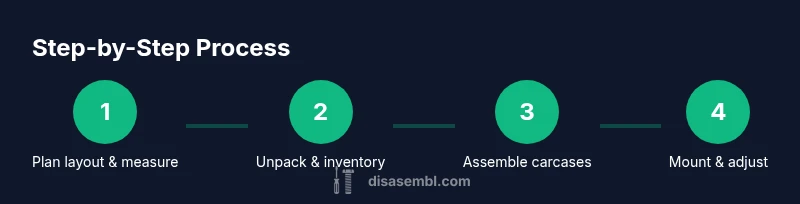
- 1
Prepare workspace and layout
Set up a spacious, well-lit area. Mark the floor and wall lines to establish where each cabinet will sit. Confirm that there is clearance for doors and drawers to operate without obstruction.
Tip: Use painter’s tape to outline the cabinet footprint on the floor and walls so you can visually confirm spacing before moving heavy parts. - 2
Unpack and inventory components
Open all boxes and lay out parts on a flat surface. Cross-check against the BOM to ensure you have boxes, doors, shelves, and hardware. Report any missing pieces to the supplier before you begin assembling.
Tip: Keep hardware in labeled containers and reference the instruction sheet to avoid misplacing parts. - 3
Assemble cabinet carcases
Start with box shells; dry-fit panels to ensure squareness. Use wood glue at joints if recommended and clamp pieces while the joints set. Verify that shelves are aligned and that interior dimensions match the planned layout.
Tip: Double-check squareness with a carpenter’s square and keep joints tight before you tighten final screws. - 4
Install doors and drawer hardware
Attach doors using the hinges and ensure consistent overlay. Install drawer fronts and slides per manufacturer instructions. Test-open and close to check alignment; adjust hinges if necessary.
Tip: Mark hinge positions on the cabinet sides before drilling to maintain uniform alignment across all doors. - 5
Mount cabinets to the wall
Locate studs and mark mounting points. Drill pilot holes, then secure boxes to the wall with appropriate anchors into studs. Use a level to ensure each unit is plumb and aligned with adjacent modules.
Tip: Have a helper hand you heavy sections and verify alignment after each mounting step. - 6
Final adjustments and finish
Check all gaps, tighten fasteners, and adjust doors for smooth operation. Install toe-kicks if required and perform a final wipe-down to remove dust before use.
Tip: Re-check alignment after settling; some cabinets may shift slightly as screws compress the frame.
Got Questions?
What does 'ready-to-assemble' mean for office cabinets?
RTA means the cabinet parts are shipped flat-packed and require home assembly. You typically assemble the boxes, doors, shelves, and hardware using common tools. This reduces shipping weight and costs while offering flexible layouts.
RTA means you get flat-packed parts you assemble at home, which cuts shipping costs and lets you customize the layout.
Can I install RTA office cabinets myself?
Yes. With proper planning, measuring, and the right tools, most homeowners can install RTA cabinets. For long runs or high shelves, consider getting a helper to manage heavy pieces.
Yes, you can usually install them yourself with careful planning and the right tools.
What tools do I need for installing ready-to-assemble office cabinets?
Essential tools include a drill, level, stud finder, tape measure, and screwdrivers. Clamps and a utility knife can also help with precise assembly and trimming.
You’ll need a drill, level, stud finder, tape measure, and screwdrivers at minimum.
How long does it typically take to install office cabinets?
Time depends on wall length and complexity. A small 6–8 foot run might take 2–4 hours; larger or corner configurations can take longer, especially if mounting conditions require extra steps.
Most small installs take a few hours; larger projects may take a full day.
What safety precautions should I follow?
Wear eye protection and gloves; work with a partner for heavy pieces; keep tools away from children; unplug power tools when not in use. Follow manufacturer safety instructions for all components.
Wear safety gear and keep the workspace secure while using power tools.
How do I customize for unique spaces?
Choose modular configurations that fit your wall and desk plan. Use adjustable shelves and filler panels to accommodate odd dimensions and achieve a seamless look.
Modular kits let you adapt to odd spaces as needed.
Watch Video
What to Remember
- Plan layout thoroughly before assembly
- Mount into studs for safety and stability
- Keep hardware organized to prevent misplacement
- Check alignment and gaps after installation
- Customize with modular components for future upgrades