Open an Online Business Account: A Practical Guide
Comprehensive, practical guidance on how to open an online business account, including documents, provider selection, security, and setup tips. A Disasembl how-to for DIY founders seeking a smooth, compliant onboarding.


To open an online business account, gather your legal documents, choose the right bank and platforms, complete the application, and verify your identity. You’ll link your business to your tax ID, set up signatories if needed, and ensure compliance with local regulations. This guide from Disasembl walks through the essential steps and checks to avoid delays.
Why open an online business account
According to Disasembl, starting with a dedicated online business account helps separate personal and business finances, which simplifies bookkeeping and tax preparation. For DIY founders, this separation reduces the risk of commingling funds and improves cash flow visibility. The Disasembl team consistently finds that business accounts enable streamlined invoicing, smoother merchant integration, and clearer financial reporting—crucial when you scale from a side project to a full-time venture. This guide on how to open online business account also covers the practical nuances that can slow you down if skipped, such as document readiness and identity verification timelines.
Beyond banking, consider how your online business account will interact with your payment gateway, accounting software, and payroll tools. A cohesive setup saves time in month-end closes and helps you present a professional financial picture to lenders or investors. Remember that the right account grows with your business, offering features like multi-user access, mobile banking, and automated reconciliations as your needs evolve.
Understanding the landscape: banks vs fintechs vs merchant accounts
Choosing where to open your account matters. Traditional banks often provide robust support, line-of-credit options, and wide ATM networks, but onboarding can be slower and fees vary by tier. Fintech-focused banks and payment platforms typically offer faster onboarding, better integration with e-commerce tools, and transparent, per-transaction pricing. For many DIY businesses, a hybrid approach works best: maintain a primary business bank account for cash management, plus a connected payment processor and a merchant account for card acceptance. This blend reduces bottlenecks when you scale to online sales, subscriptions, or international orders. Disasembl’s research highlights the importance of compatibility with your preferred invoicing, accounting, and inventory systems to minimize double-entry work and data silos.
Eligibility and prerequisites you should check upfront
Most providers require your business to be legally registered and in good standing in your country. If you’re a sole proprietor, you’ll typically use your personal Social Security Number or equivalent tax ID for onboarding, but many banks encourage opening a distinct business entity. You’ll also need a valid government-issued ID, proof of business address, and a corporate document packet (e.g., Articles of Incorporation). If you’re enrolling a remote team or multiple signatories, prepare a list of authorized users and their roles. Understanding these prerequisites early helps you avoid rejections and resubmissions that waste time.
Documents you’ll need: personal and business data in one place
Prepare both personal and business documentation before you start the application. Personal items include a government ID, SSN or tax ID, and proof of address. For the business, gather your EIN/tax ID, legal business name, date of incorporation, business address, and a brief description of your activities. If you operate under a DBA (doing business as) name, include the registration certificate. Scan or save high-quality copies (PDF preferred) and ensure file sizes meet each provider’s limits. Having a single, organized folder for all documents makes the application flow faster and reduces the chance of missing an item during upload.
Choosing the right provider: align features with your growth path
Look for a provider that fits your deployment speed and growth plans. If you’re primarily selling online, prioritize payment processing speed, card-present vs. card-not-present capabilities, and fraud protection. For service-based businesses, consider invoicing features, client portals, and multi-user access. If you expect international sales, verify supported currencies and cross-border fees. Consider whether you want integrated accounting exports (CSV, QBO, or Xero), ACH transfers, merchant services, and chargeback handling. Finally, examine customer support hours, onboarding complexity, and the ability to upgrade tiers as your needs expand.
Step-by-step: from application to activation
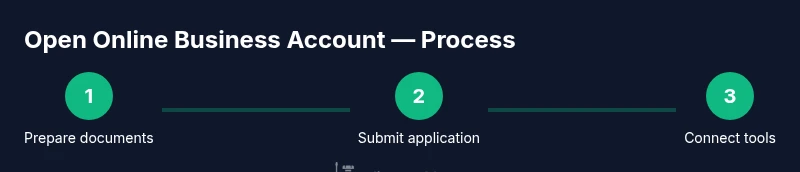
By now you should have prepared your documents and defined your needs. The actual onboarding involves submitting your application, uploading documents for identity and business verification, and configuring security settings. After approval, you’ll set up account preferences, link payment gateways, and connect with your accounting software. Activation times vary by provider; some accounts are ready within minutes, while others might take 1–3 business days for final verification. Plan for a short interruption in service during the onboarding window so you can verify balances and test transfers.
Security, compliance, and governance basics
Security should be your top concern. Enable multi-factor authentication (MFA), use strong, unique passwords, and review login alerts. Set user roles with the principle of least privilege to limit access to sensitive data. Ensure you understand the provider’s terms of service, data privacy policy, and any required KYC (Know Your Customer) compliance steps. If your business handles sensitive customer information (PII or payment data), confirm PCI compliance requirements and data encryption standards. Regularly review access logs and conduct quarterly security audits as your team grows.
How to avoid common onboarding pitfalls
Timing is a frequent bottleneck. Start early by gathering documents and clarifying who has authority to sign. Mislabeling business information or uploading blurry scans causes delays; double-check IDs and filings before submission. Some providers require additional documents for high-risk industries or for non-US entities; anticipate these requests and have ready-to-share explanations. Finally, don’t rush the security setup—the extra 5–10 minutes invested in enabling MFA and emergency contact recovery can prevent costly breaches.
What to do after you’re live: integration and optimization
Once your account is active, immediately connect your payment processor, e-commerce platform, and accounting software. Test a few transactions end-to-end (from checkout to bank reconciliation) to confirm data accuracy. Set up recurring payments and cash flow forecasting dashboards. Schedule monthly reconciliations and quarterly reviews to maintain clean books. With a well-configured online business account, you’ll have a reliable financial backbone that supports growth, reporting accuracy, and smoother tax time.
Tools & Materials
- Business ID (government-issued)(Passport or driver’s license, plus any national ID as applicable)
- Employer Identification Number (EIN) or tax ID(IRS/Tax authority documentation or equivalent in your country)
- Articles of Incorporation or Registration(Proof you’re legally registered as a business)
- DBA/Doing Business As certificate (if applicable)(If you operate under a separate trade name)
- Proof of business address(Utility bill, lease, or bank-issued statement)
- Business email and phone number(Dedicated contact info for the business)
- Scans of all documents(PDF scans preferred; ensure legibility)
- Device with internet access(Laptop or tablet for the application process)
Steps
Estimated time: 60-120 minutes
- 1
Define banking needs
Clarify why you need an account (invoicing, payroll, merchant services) and forecast growth. This helps you pick a provider with the right features and tier.
Tip: Write a one-page needs list to compare against features during shopping. - 2
Gather essential documents
Assemble personal and business documents in a single folder. Missing items often cause onboarding delays.
Tip: Organize with clear filenames (Name_Document_Type_Date.pdf). - 3
Compare providers
Evaluate banks and fintechs based on fees, speed, integrations, and customer support. Create a short scoring rubric.
Tip: Prioritize integrations with your e-commerce platform and accounting software. - 4
Prepare business information
Ensure you have the exact legal business name, address, and tax ID aligned across documents.
Tip: Double-check for typos that could trigger verification failures. - 5
Start the online application
Fill the form with the exact business details. Use a desktop for stability and faster uploads.
Tip: Use a consistent contact email that you’ll monitor. - 6
Upload documents and verify identity
Submit scans and complete identity verification. You may be asked for a video call or additional documents.
Tip: Be ready for a short verification window and respond promptly. - 7
Set up security features
Enable MFA, set recovery options, and assign user roles. This reduces the risk of data breaches.
Tip: Require all signatories to use separate, strong passwords. - 8
Link payments and accounting
Connect your bank to payment processors and import transactions into your accounting system.
Tip: Test a small transaction to verify data flows correctly.
Got Questions?
What is an online business account?
An online business account is a financial account designed for business use that you manage primarily over the internet. It supports banking, payments, and often merchant services for customers.
An online business account is a business-focused bank account you manage online, including payments and merchant features.
What documents are commonly required to open one?
Typical requirements include government-issued ID, proof of business address, your EIN or tax ID, Articles of Incorporation or registration, and any DBA certificates if applicable. Providers may vary.
You’ll usually need ID, proof of address, tax ID, and business registrations.
Can sole proprietors open an online business account?
Yes. Many providers support sole proprietors, often using your personal tax ID for verification while keeping business finances separate.
Yes, most banks allow sole proprietors to open an online business account with proper documentation.
How long does verification take after applying?
Verification times vary by provider, but many accounts are ready within minutes to a few business days after submission of documents.
It usually takes a few minutes to a couple of days, depending on the provider.
Are there any setup or monthly fees?
Fees vary by provider and plan. Look for monthly maintenance fees, transaction fees, and any activity-based charges. Some startups offer waived or reduced fees.
Fees depend on the plan; some providers offer free tiers or waivers for startups.
Should I open multiple accounts for different purposes?
Many businesses benefit from separating banking, merchant services, and payroll. This reduces clutter, simplifies reconciliation, and improves cash controls.
Yes, separate accounts for banking and payments can keep your finances cleaner.
Watch Video
What to Remember
- Prepare documents before starting
- Compare providers for fees and integration
- Enable MFA and strong passwords
- Verify data consistency across forms
- Plan post-onboarding integrations early