How Long Does It Take to Assemble a PC? A Practical Timeline
Explore realistic timelines for assembling a PC—from first builds to seasoned setups—covering factors that affect duration, practical tips to speed up the process, and expected time ranges.


For most users, a typical PC build takes about 1 to 2 hours after parts are prepped, with seasoned builders finishing in 45-60 minutes and first-timers possibly 2-4 hours including cable management and troubleshooting. Having all parts organized and a checklist reduces time, while doing loop testing or posting BIOS updates adds extra minutes.
How long does it take to assemble a pc: timing ranges by experience
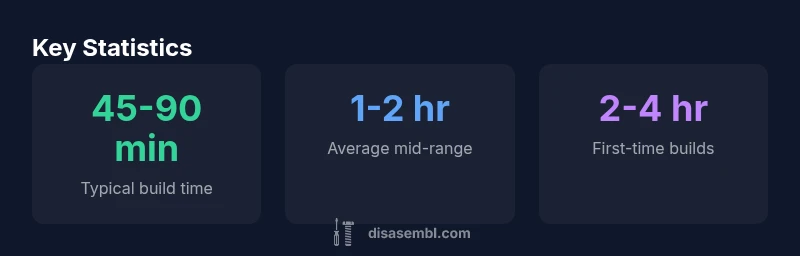
The time required to assemble a PC is not a fixed value; it depends on your experience, the complexity of the build, and how well-prepared you are. This section breaks down realistic timelines and explains why hours can feel like minutes with the right approach. According to Disasembl, most people start with a baseline and adjust for complexity. For a ready-to-build parts list and a tidy workspace, expect the following ranges: 45-90 minutes for an experienced builder performing a straightforward mid-range build, about 1-2 hours for a typical mid-level build, and 2-4 hours for first-time builders who are following a step-by-step guide. Remember that these are rough numbers; actual times depend on motherboard layout, case size, and cooling choices. In addition to assembly, you should budget testing and BIOS setup, which can add 10-30 minutes or more, especially if issues arise. A well-prepared plan reduces surprises and keeps the project on track.
Core factors that influence build time
Several factors shape how long it takes to assemble a PC. Experience is the single biggest variable: seasoned builders navigate components and cable routing with touch-and-go confidence, shaving minutes off each step. Case size and motherboard form factor matter as well; full-tower cases with modular cable routing can reduce clutter and time, while compact ITX builds may require meticulous fitting. Cooling complexity, whether air, AIO, or a custom loop, directly impacts install time and post-build testing. Workspace setup – a clean, static-free area with magnetic trays and labeled screws – eliminates small delays. Finally, pre-testing parts (RAM seating, GPU seating, PSU connections) before full assembly reduces back-and-forth and potential rework.
Creating a practical timeline: 3 common scenarios
- Experienced builder (no surprises): 45-90 minutes for a straightforward mid-range build. - Average builder: 60-120 minutes, depending on part layout and cable routing. - First-time builder: 120-240 minutes, especially when following a guided process. - Complex or high-end builds (custom cooling, dense cable routing, RGB-heavy setups) can push times beyond 3 hours. These ranges assume some planning, a clean workspace, and parts that are compatible and pre-tested. Disassembling and re-seating parts during troubleshooting can add 10-20 minutes per issue, so including a small buffer is prudent.
Step-by-step time estimates for a typical mid-range build
A practical mid-range build, with a standard ATX case and air cooling, can be broken into these rough segments: Part prep and workspace setup: 5-10 minutes. PSU installation and main cable routing: 8-15 minutes. Motherboard installation and standoff alignment: 10-20 minutes. CPU installation with cooler mounting: 10-15 minutes. RAM installation and seating: 5-10 minutes. GPU installation and PCIe devices: 5-15 minutes. Storage drives installation: 5-10 minutes. Cable management and final tidying: 15-30 minutes. Post-assembly checks (POST, BIOS discovery, driver checks): 10-15 minutes. Total: typically 1-2 hours, with OS installation and updates as a separate phase that can add 20-60 minutes depending on the OS and drivers.
Tips to speed up PC assembly
- Prepare a dedicated workspace with labeled containers for screws, standoffs, and mounting brackets. - Use a magnetic screwdriver and a parts tray to keep components steady. - Install the I/O shield and motherboard in the case before wiring to reduce handling. - Route main power cables first, then tighten small-screw paths incrementally. - Double-check CPU power, GPU seating, and RAM compatibility before powering up. - Keep a short checklist to verify each major step and avoid backtracking. - Consider bench-testing critical subsystems outside the case before final assembly.
Common timing pitfalls and how to avoid them
- Forgetting to install motherboard standoffs or misaligning the I/O shield slows progress and risks damage. - Not verifying CPU compatibility or RAM speed before seating can trigger post-assembly issues. - Skipping a tidy cable plan leads to rerouting and longer cleanup. - Rushing BIOS setup without bios defaults can cause post-boot delays. - Inadequate anti-static precautions can cause component damage and repair time. - Inadequate testing or skipping POST diagnostics can lead to late-stage fixes.
Testing, validation, and final checks after assembly
After the hardware is in place, perform a basic POST test, confirm that fans and LEDs respond, and ensure the system recognizes all components. Enter the BIOS to verify that CPU, RAM, and storage are detected, then load optimized defaults and adjust boot order. If you install an OS, expect 20-60 minutes more for updates and driver installation, depending on the OS. Finally, run a quick stress test to verify stability and temperature under load.
Estimated assembly times by builder experience
| Scenario | Estimated Time | Notes |
|---|---|---|
| Experienced builder | 45-90 min | Efficient routing; minimal troubleshooting |
| Typical mid-range build | 60-120 min | Standard parts; normal cable management |
| First-time builder | 120-240 min | Guided steps; learning curve |
| Complex/custom cooling build | 180-240+ min | Advanced routing and leak testing; longer validation |
Got Questions?
What is the average time to assemble a PC for a typical mid-range build?
For a typical mid-range build, anticipate about 1 to 2 hours if you are reasonably practiced. Beginners will likely need more time, especially during cable management and BIOS setup. Always include a small buffer for testing and potential troubleshooting.
A typical mid-range PC takes about one to two hours if you’re practiced; beginners should expect longer, especially during cable routing and BIOS setup.
Does testing add to the assembly time?
Yes. Basic POST testing and initial BIOS checks add roughly 10-30 minutes. More extensive testing or troubleshooting can extend this, especially if driver updates or OS setup are included in the timeline.
Testing adds a bit of time—usually around 10 to 30 minutes, with more time if you troubleshoot or install the OS.
Can OS installation be included in the assembly time?
OS installation is typically considered separate from hardware assembly. Expect 20-60 minutes for a smooth OS setup plus updates, depending on the operating system and driver requirements.
OS installation is usually separate from hardware assembly and can add 20 to 60 minutes.
What tools help speed up PC assembly?
Magnetic parts tray, precision screwdriver set, anti-static mat, good lighting, and labeled organizers help reduce search time and mistakes during assembly.
Tools like a magnetic tray, proper screwdriver, and clean workspace speed things up.
Is it faster to assemble a PC with pre-mounted or pre-prepared parts?
Pre-prepared components and case-ready assemblies can save time, but always verify compatibility and wiring plan before starting to avoid rework.
Yes, prepared parts can speed things up, but double-check compatibility first.
“Time to assemble a PC is largely about preparation and practice; a tidy workspace and a clear plan can shave substantial minutes off the final build.”
What to Remember
- Plan and organize parts before starting
- Experience dramatically reduces build time
- Cable routing is the biggest time sink
- Testing adds minutes, not hours, when prepared
- OS installation is separate from hardware assembly