How to Open an Online Zero Balance Account: Step-by-Step
Learn how to open an online zero balance account with a clear, practical guide. We cover eligibility, required documents, e-KYC, safety tips, and common pitfalls to avoid, all from the Disasembl team.


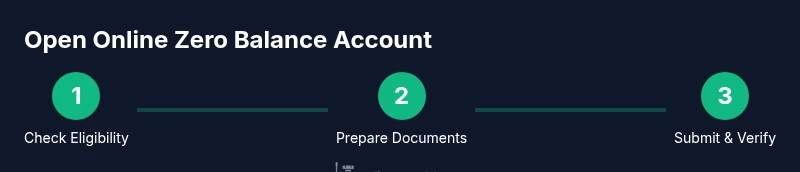
Opening an online zero balance account is a straightforward, five-step process: verify eligibility, prepare digital documents, complete e-KYC, submit the online application, and confirm your account. According to Disasembl, most banks now offer zero-balance options with quick online approvals and minimal fuss. This guide walks you through each step so you can start banking online today.
What is a zero balance account and why use it online
A zero balance account is a banking product that typically does not require you to keep a minimum balance. Opening it online saves you time and lets you manage funds through a smartphone app or a secure web portal. For DIY enthusiasts, Disasembl notes that online onboarding has become the norm, enabling faster access to essential banking tools without visiting a branch. You can perform routine tasks like transfers, bill payments, and balance checks from anywhere with an internet connection. Always read the terms to understand any limits on features such as card usage, cash withdrawals, or merchant payments. By choosing a zero balance option, you gain flexibility and reduce maintenance costs while keeping banking simple and portable.
Eligibility and prerequisites
Most providers require you to meet basic criteria: age of majority, confirmed identity, and a valid address. Many banks also verify you have a compatible device and reliable internet. Before applying, check that you can receive OTPs and notifications to a registered mobile number and email. The Disasembl team recommends compiling a short checklist of your personal details, contact information, and preferred account type so you can move quickly through the application. If you anticipate occasional overdraft or premium services, be sure you understand any potential charges that could apply after a grace period.
How to compare zero balance offers
Not all zero balance accounts are identical. Compare monthly fees (if any after a no-fee period), transfer limits, customer support options, and the ease of online verification. Look for apps with clear security prompts, straightforward dispute resolution, and transparent terms. Consider whether the provider supports convenient features you care about, such as instant transfers or cardless withdrawals. The Disasembl analysis indicates that online onboarding speeds vary, but most major providers now emphasize a smooth digital experience with robust fraud protections. Choose a product that aligns with your daily needs and offers simple ways to upgrade if your circumstances change.
Documents and identity checks you’ll likely need
Prepare digital copies of government-issued ID (like a passport or national ID), proof of address (such as a recent utility bill or bank statement), and a selfie for facial recognition. You may also be asked for tax IDs or PAN numbers depending on your country and the bank’s policy. Ensure all documents are clear, legible, and match the information you submit on the form. Keep your originals handy in case the provider requests verification for higher-risk actions. A clean, well-lit scan will speed up the process and reduce back-and-forth requests.
The onboarding journey: an online application overview
Most banks provide a guided online flow: sign up, enter personal details, upload documents, and complete identity verification. You’ll typically be asked to set up security features like a password and two-factor authentication. Expect short waiting periods for automated checks and potential follow-up actions if additional verification is needed. Have your mobile device ready to receive OTPs and push notifications. Throughout the process, monitor inboxes and the bank’s in-app messages for status updates and any requests for further information.
E-KYC and verification timing
Electronic Know Your Customer (e-KYC) is designed to validate your identity digitally. In many cases, you’ll complete it in the same session as your application, with video calls or selfie verification as optional steps. Timing varies by provider, but online verification is usually faster than in-branch checks. If verification pauses, check that you provided the correct details and that your documents are legible. You can often resubmit quickly via the same portal, minimizing delays.
Security, privacy, and ongoing account management
Once your account is open, enable two-factor authentication and use a strong, unique password for the banking app. Avoid public Wi-Fi when entering sensitive information and be cautious of phishing messages. Regularly review transaction alerts and keep device software up to date. If you notice unusual activity, report it immediately and activate any available fraud protections. The key to long-term safety is vigilance and disciplined digital habits.
Common mistakes and how to avoid them
Don’t rush through the application without verifying every detail. Small mismatches in your name, address, or ID numbers can trigger delays or rejection. Upload the highest-quality scans you have and double-check that everything matches your official documents. Beware of phishing sites or fake offers supporting zero balance accounts; always use the bank’s official app or website. Finally, don’t assume a zero balance means you can ignore terms—review fees, limits, and renewal conditions to avoid surprises later.
Tools & Materials
- Smartphone or computer with internet access(Stable connection recommended for smooth onboarding)
- Digital copies of government-issued ID(Scan or photo quality should be high)
- Proof of address(Utility bill or official document within valid range)
- Tax ID or PAN (if requested)(Only provide if the bank asks for it)
- Mobile phone for OTP(SMS or in-app verification required)
- Email address(Used for confirmations and alerts)
Steps
Estimated time: 20-60 minutes
- 1
Check eligibility
Confirm you meet the basic age and identity requirements for online onboarding. Review any regional rules or limits for zero balance accounts before applying.
Tip: If you’re unsure, start with a trial product that offers a no-commitment test. - 2
Compare zero balance offers
Look at both the no-minimum-balance policy and any post-no-fee conditions. Consider app usability, customer support, and the presence of fraud protections.
Tip: Create a short rubric to score each option against your needs. - 3
Gather digital documents
Prepare scans or photos of your ID, address proof, and any required tax IDs. Ensure file clarity and that names match your application.
Tip: Label files clearly to avoid misidentification during verification. - 4
Start online application
Fill out the form with accurate personal details and upload your documents. Use a secure device and avoid public networks.
Tip: Double-check entries before submission to minimize rechecks. - 5
Complete e-KYC verification
Finish the e-KYC step through video call or automated checks as required. You may need to authorize a facial scan or a live photo.
Tip: Have your ID handy for quick verification and keep your camera steady. - 6
Set up security and access
Create a strong password and enable two-factor authentication. Review permission settings for notifications and data sharing.
Tip: Use a password manager to store credentials securely.
Got Questions?
What is an online zero balance account?
An online zero balance account is a banking product with no required minimum balance, opened and managed digitally. It typically supports basic banking functions and aims for convenient access without branch visits.
A zero balance account allows basic banking with no minimum balance and is open and managed online.
Who can open online zero balance account?
Most providers require age eligibility and identity verification. Some regions may have additional checks, so review the terms for your locale.
Most people who meet age and identity checks can apply online.
What documents are needed for KYC?
Typical requirements include government-issued ID, proof of address, and a selfie for verification. Some banks may request additional IDs depending on local rules.
You’ll usually need an ID, address proof, and a selfie for verification.
Are there any fees for zero balance accounts?
Many zero balance accounts carry no monthly maintenance fee. Some banks may offer paid premium features; review the full terms to understand any future charges.
Most have no monthly fee, but read terms for potential charges on premium features.
Can I open the account completely online?
Yes. The application, verification, and setup can be completed online. Some steps may require a short video call or photo verification.
Yes, you can complete the whole process online.
What security practices should I follow?
Enable two-factor authentication, use a password manager, avoid public networks for onboarding, and monitor alerts for any unfamiliar activity.
Use two-factor authentication and stay vigilant about alerts.
How do I add money to the new account later?
Most providers let you link another bank account or card to transfer funds. Check transfer limits and timeframes for your chosen service.
You can link another bank account to fund it.
What should I do if verification stalls?
If checks stall, double-check document quality and details. Contact customer support and be ready to re-submit the verification steps.
If verification stalls, verify documents and contact support.
Watch Video
What to Remember
- Verify eligibility before starting.
- Prepare digital IDs and address proof in advance.
- Complete e-KYC promptly to avoid delays.
- Enable MFA and maintain strong security habits.
- Read terms to avoid hidden charges after onboarding.