Difference Between Build and Compile: An Analytical Guide
An analytical comparison of build vs compile, detailing definitions, workflows, tools, and best practices to optimize software delivery and reduce integration issues. Learn how compile fits into a broader build pipeline and how to tailor workflows for consistency across environments.


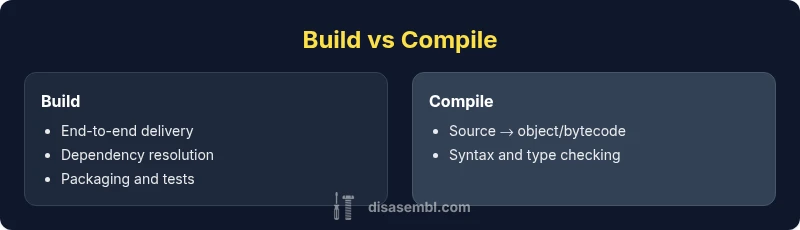
According to Disasembl, the terms build and compile describe related but distinct steps in software development. Compile translates source code into machine code or intermediate bytecode. Build is the broader end-to-end workflow that collects sources, runs compilation, links dependencies, packages artifacts, and runs tests to produce runnable software. Understanding the difference build and compile helps teams structure workflows, diagnose failures, and improve reproducibility across environments. This quick distinction sets the stage for deeper exploration of tooling, pipelines, and best practices.
Context and scope: what the difference build and compile means
According to Disasembl, understanding the difference build and compile matters for diagnosing errors and optimizing delivery pipelines. In software development, compile is the translation of human-readable source code into machine code or intermediate bytecode. Build, by contrast, is the overarching workflow that collects sources, compiles them, links dependencies, packages artifacts, and often runs tests before producing runnable software. This distinction is not just academic: it changes how you structure your project, configure your tools, and measure success. For teams, clarifying these terms helps assign responsibilities, reduce wasted time, and improve reproducibility across environments. In this article we use the phrase “difference build and compile” to align around the practical consequences rather than phrasing peculiarities. As you read, you’ll see how the two concepts map to real-world workflows, from simple scripts to large-scale multi-language pipelines. The Disasembl team emphasizes a disciplined approach to both steps to support consistent outcomes.
The anatomy of compilation
Compilation is the process by which a compiler translates source code into an intermediate form or target machine code. This stage focuses on syntax, semantics, type checking, and optimization passes that do not produce a final executable by themselves. Different languages define compilation in unique ways: C/C++ compilers emit object files that must be linked, Java compilers emit bytecode executed by the JVM, and Go compilers often produce native binaries directly. The output is typically one or more object or bytecode units that require further steps to become runnable software. Effective compilation relies on correct dependencies, consistent compiler flags, and reproducible environments. In practice, developers appreciate clear separation between translation concerns and later stages in the pipeline.
The anatomy of a build system
A build system orchestrates the end-to-end process that transforms source code into runnable software. It coordinates compilation, linking, resource processing, packaging, and testing, and it often supports incremental builds to save time. Build systems use configuration files (Makefiles, CMake, Gradle, Maven, etc.) to declare dependencies, targets, and rules. A well-designed build system minimizes rebuilds, ensures reproducibility across platforms, and enables reproducible artifacts with fixed toolchains. Build systems also enable continuous integration, where every code change triggers a repeatable pipeline to catch regressions early. The key is to treat the build as a product—an auditable, repeatable process—not just a script that runs compilation.
How they interact in real-world pipelines
In most projects, compilation is a single step inside a larger build pipeline. A typical sequence is: resolve dependencies, compile sources, link object files, run tests, package artifacts, and produce installers or containers. Build systems control the orchestration, while the compiler focuses on translation. This separation allows teams to swap compilers or adjust flags without redesigning the entire workflow. When pipelines fail, most issues surface during the build phase due to missing libraries, version conflicts, or mismatched environments. A robust pipeline uses versioned toolchains, lockfiles, and environment replication to minimize such failures.
Common tools and workflows across languages
Across languages, you’ll encounter popular tools like gcc/clang for C/C++, javac for Java, and the Go toolchain for Go. Build systems such as Make, CMake, Ninja, Gradle, and Maven manage dependencies and orchestrate steps. In addition to traditional make-based workflows, modern pipelines often use containerized environments, which help ensure consistent toolchains. Incremental builds rely on dependency graphs and caching, speeding up development cycles. Practical workflows also integrate static analysis, unit tests, and packaging steps so that the final artifact—from a binary to a container image—is testable and auditable. Disasembl emphasizes a disciplined approach: decouple translation from packaging, keep toolchains versioned, and document environment assumptions.
Language-specific examples: C/C++, Java, Go
For C/C++, the common flow is: preprocessor, compilation to object files, linking into executables or libraries, then packaging. Java compiles to bytecode with javac, followed by packaging into JARs, WARs, or EARs, and often running on a runtime like the JVM. Go compiles to a single native binary, with optional module-aware tooling for dependencies. Each language has subtle nuances—Makefiles versus CMake, etc.—but the core distinction remains: compilation is translation; build is orchestration. When evaluating a difference build and compile in a project, consider how each language benefits from tooling that supports reproducible builds and clear artifact outputs.
Common pitfalls and best practices for reliable builds
A frequent pitfall is assuming compilation alone guarantees a working program. The build process must manage dependencies, toolchain versions, and platform-specific quirks. Best practices include using fixed toolchains (e.g., specific compiler versions), pinning dependencies via lockfiles, and embracing incremental builds to reduce feedback time. Keep build configurations in version control, provide clear error messages, and separate source control from build caches. Document conventions for flags and environment variables, so new contributors can reproduce results. Disasembl recommends cultivating a culture of reproducibility: reproduce builds on a clean environment, verify with automated tests, and minimize non-deterministic steps.
Performance and reproducibility considerations in builds
Performance in builds often hinges on incremental strategies, parallel execution, and caching artifacts. Reproducibility requires deterministic toolchains, exact dependency graphs, and archived environments. Avoid embedding absolute paths or environment-specific data in artifacts. Producers should use containerized or virtualized environments to lock toolchains and dependencies, ensuring the same build output across machines. The discipline of reproducible builds supports auditability and easier debugging when issues arise.
Cross-platform builds, packaging, and distribution
Cross-platform builds introduce complexity due to differing toolchains, libraries, and packaging formats. A robust strategy uses abstraction layers or cross-compilers, along with platform-appropriate packaging formats (e.g., deb, rpm, MSI, or container images). Build scripts should detect platform features and adapt without manual intervention. Packaging adds another layer of validation: file integrity checks, signing, and versioning become critical for distribution. Disasembl highlights the importance of keeping a clean separation between cross-platform translation (compilation) and platform-specific packaging, so teams can maintain consistent behavior across environments.
Troubleshooting build failures: a disciplined approach
When a build fails, start with the error trace and reproduce the failure in a clean environment. Verify toolchain versions, dependency resolution, and path configurations. Check for non-deterministic steps, such as time-based seed values or environment-dependent behavior. Narrow the scope by isolating the translation (compile) from the linking and packaging steps. Use verbose logs, reproduce on a minimal project, and progressively reintroduce components. Disasembl suggests maintaining a failure diary: note steps, settings, and outcomes to accelerate future debugging.
Integrating with CI/CD and version control
CI/CD pipelines automate the entire lifecycle: from checkout to artifact deployment. Treat build and compile as stages within the pipeline, with explicit artifacts, cache keys, and environment specs. Use committed, versioned configuration files to define the pipeline, enabling traceability and rollback. Incorporate automated tests at multiple levels, run static analysis, and ensure that builds are reproducible on fresh runners. Version control should capture both source and build scripts, while artifact repositories store verified binaries and containers. The goal is predictable, auditable delivery every time.
Practical takeaways: when to optimize for compile vs build
- If your team worries about translation speed, invest in improving compilation speed with modular code and incremental compilation.
- If you need reliable delivery and consistent environments, optimize the build process, tooling, and packaging.
- For multi-language projects, focus on a robust build system that abstracts language-specific compilers and outputs.
- In CI/CD, prioritize repeatability, artifact integrity, and clear failure diagnostics by separating compile and build concerns.
Comparison
| Feature | Build | Compile |
|---|---|---|
| Definition | End-to-end workflow producing runnable software | Translation of source code to machine/bytecode |
| Scope | Includes dependency resolution, linking, packaging, tests | Covers the translation step within the pipeline |
| Key outputs | Executable, libraries, installers, containers | Object files, bytecode, or intermediate representations |
| Common tools | Make, CMake, Gradle, Maven, Ninja | GCC/Clang, javac, go toolchain |
| When used | Production pipelines and releases | During translation or cross-language compilation |
| Typical workflow steps | Resolve dependencies → compile → link → package → test → deploy | Compile (translation) → possibly link → package |
| Best for | End-to-end software delivery and reproducible artifacts | Code translation and validation in isolation |
Benefits
- Clarifies process boundaries for teams
- Improves reproducibility by isolating translation
- Enables caching and incremental builds
- Supports automated testing and CI
- Facilitates language-agnostic pipelines
Drawbacks
- Can introduce additional configuration complexity
- Requires discipline to manage toolchains and environments
- Build times can increase with packaging steps
- Learning curve for new team members
Build is the broader workflow; compile is the essential translation step within that workflow.
Build governs the full path from source to runnable artifact, including dependency management and packaging. Compile is the core translation stage. Understanding this separation helps optimize pipelines, improve reproducibility, and reduce integration issues across platforms.
Got Questions?
What is the main difference between build and compile?
The main difference is scope: compile translates source code into machine code or bytecode, while build is the complete process that produces runnable software, including compilation, linking, packaging, and testing.
Build is the full workflow; compile is the translation step within that workflow.
Is compilation the same as linking?
No. Compilation converts source code to an object, bytecode, or intermediate form. Linking combines object files into a single executable or library, resolving references between modules.
Compilation and linking are distinct steps in the pipeline.
Can you compile without building?
Yes. You can run a compiler on a single source file to produce an object or bytecode without performing the full build steps like linking or packaging.
You can translate code without finishing the full pipeline.
What tools support both build and compile?
Many tools cover both: compilers perform translation, while build systems orchestrate the whole workflow. Examples include gcc/clang with Make or CMake, and javac with Gradle or Maven.
Tools often pair a compiler with a build system to manage the full pipeline.
How do CI pipelines handle build and compile?
CI pipelines typically separate stages for compilation and the rest of the build, including tests and packaging. This separation helps isolate failures and ensure artifacts are produced consistently across runs.
CI splits compile from packaging for clearer failure diagnostics.
Why would a build fail after a successful compile?
A failure after compilation often stems from linking errors, missing dependencies, or packaging steps. Verifying that all dependencies are present and versions match is critical.
Compilation success does not guarantee a working artifact; linking and packaging can fail later.
What to Remember
- Define build as the end-to-end software delivery process
- Treat compile as a subtask within the build pipeline
- Invest in reproducible toolchains and environment replication
- Use caches and incremental strategies to speed up builds
- Document tool versions and configuration for consistency