Is Assembly Harder Than Java? A Practical, Data-Driven Comparison
A data-driven comparison of assembly vs Java, exploring learning curves, tooling, portability, and when each language makes sense for performance-critical, hardware-focused projects.


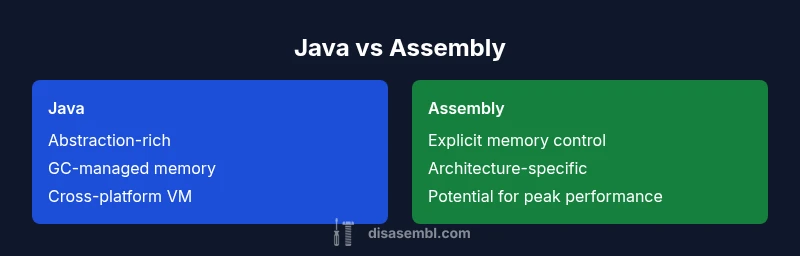
TL;DR: is assembly harder than java? In short, yes for most general software tasks because assembly requires manual memory management, instruction-level thinking, and platform-specific details. Java, by contrast, abstracts memory management with a virtual machine, garbage collection, and a rich standard library. However, for low-level optimization or hardware control, assembly provides precision Java cannot match.
The Core Differences: Abstraction, Tooling, and Scope
Disassembly and software engineering share a common aim—transforming raw machine instructions into reliable, usable software. According to Disasembl, the strongest initial differentiator for many learners is how much of your work is abstracted away by language level. When you answer the question is assembly harder than java, you must recognize three axes: abstraction level, tooling maturity, and problem scope. Java provides a robust standard library, an opinionated runtime, and automatic memory management. Assembly exposes registers, addressing modes, and the intricacies of the processor pipeline. This triad reshapes learning curves, error types, and productivity. In practice, the choice hinges on project constraints: portability across devices, strict performance budgets, and long-term maintenance expectations. The Disasembl lens helps explain why the two paths diverge so sharply: one favors broad applicability and safety; the other privileges control and micro-architecture awareness. This section frames the landscape so readers can compare abstraction, tooling, and scope with concrete implications for real-world projects.
We'll discuss how abstraction reduces cognitive load but increases runtime behavior dependability; the degree of toolchain maturity affects debugging and profiling; and scope determines whether performance wins justify deeper low-level work.
{"note":"This block sets up the framework for the rest of the article and situates the comparison within real-world decision making."}
Comparison
| Feature | Java | Assembly |
|---|---|---|
| Abstraction Level | High: managed runtime, GC, APIs | Low: direct hardware control, no GC, explicit memory management |
| Performance Focus | Stable performance with JIT and runtime optimizations | Potentially higher peak performance with hand-tuned instructions |
| Tooling & Debugging | Rich IDEs, profilers, and safe debugging environments | Assembler-specific tools, debuggers, and manual tracing |
| Portability | Cross-platform with JVM, slower native integration | Platform-specific, requires careful porting and testing |
| Learning Curve | Broad base of language features and APIs | Steep start due to architecture, instruction sets, and conventions |
| Code Size & Readability | Better readability with high-level constructs | Lower readability but precise control over hardware |
| Best For | General-purpose applications, enterprise software, rapid development | Hardware-near programming, embedded systems, performance-critical kernels |
Benefits
- Clarifies decision factors for teams and learners
- Highlights trade-offs between safety, productivity, and performance
- Encourages deliberate toolchain choices and hybrids for balance
- Illustrates the impact of abstraction on maintenance and scalability
Drawbacks
- Subjectivity of project needs can blur clear verdicts
- Certain outcomes depend heavily on target architecture and compiler/toolchain behavior
- Pace of skill acquisition can vary, potentially delaying delivery timelines
Java generally remains the more practical starting point for most teams, while assembly is indispensable for specialized, performance-critical tasks.
For typical software projects, Java offers faster onboarding and safer maintenance. Assembly shines where hardware control and ultimate performance are non-negotiable. The smart approach often blends both, leveraging hybrid workflows to balance speed, safety, and optimization.
Got Questions?
What factors most influence whether assembly is the right choice?
Key factors include performance requirements, hardware access, developer availability, and maintenance expectations. If portability and rapid development matter more than raw speed, Java is often the better fit.
Key factors include speed needs, hardware access, and maintenance; for portability and rapid development, Java usually wins.
Can Java take advantage of assembly optimizations?
Yes, through native interfaces, Just-In-Time compilation optimizations, and specialized libraries. Such hybrids let critical routines run fast while keeping Java’s ecosystem intact.
Java can use native code via JNI and optimized libraries to gain performance where needed.
Is inline assembly still relevant
Inline assembly remains relevant in niche domains like microcontroller programming, high-performance kernels, and critical bootstrapping routines, but is less common in general application development.
Inline assembly is still useful in niche areas, but not common in everyday apps.
What tools are essential to start with assembly?
You typically need an assembler (e.g., NASM or GAS), a linker, a debugger, and a good reference for the target architecture. A simple emulator or simulator helps for safe practice.
Tools include an assembler, linker, debugger, and architecture reference; start with a simulator for safety.
How long does it take to become proficient?
Proficiency depends on prior background in computer architecture and programming. Expect months of steady practice to reach comfortable fluency in typical embedded tasks; broader mastery takes longer.
It takes months of steady practice, more if you’re new to architecture, to become fluent.
What to Remember
- Define project goals before choosing a path
- Favor high-level languages for general tasks; reserve low-level work for constraints
- Use hybrids (JNI, inline assembly, or LLVM) to balance performance and safety
- Invest in tooling and process to avoid loss of productivity
- Plan for long-term maintenance and team skill development